
M3U8 Download Failed: HLS Troubleshooting
An M3U8 download usually fails because the playlist wasn't detected, an online tool hit cross-origin restrictions, or the stream expects access credentials from the original video page. This guide walks through the actual HLS download pipeline so you can pinpoint which step failed, why, and how to fix it.
First, Understand the HLS Download Pipeline
HLS isn't a single URL that pulls one file. It's a pipeline—if any stage breaks, the end result is a "failed download" or a corrupted file. Knowing the pipeline gives you somewhere to start:
① Detect M3U8        ② Parse Manifest     ③ Download Segments   ④ Decrypt      ⑤ Merge/Remux
   ↓                    ↓                      ↓                    ↓               ↓
 webRequest           m3u8-parser           Worker Pool         WebCrypto      FFmpeg WASM
 intercepts           distinguishes         parallel .ts        AES-128-CBC    TS → MP4
 requests             Master/Media          fetches +           (if needed)    or direct concat
                      retry backoff
| Stage | Failure looks like | Jump to |
|---|---|---|
| ① Detect | Popup shows "no media detected" | Can't Detect M3U8 |
| ② Parse | Manifest downloaded but quality/segment list is empty | Manifest Parsing Issues |
| ③ Download | Progress stalls, 403, 404, CORS | Segment Downloads Failing |
| ④ Decrypt | Decrypt error, or silent/corrupt output after merge | Encrypted Streams Failing to Decrypt |
| ⑤ Merge | File exists but won't play, or audio out of sync | Merged File Won't Play |
EXT-X-KEY, multiple audio tracks), see Video Sniffing — HLS (M3U8) Streams. To see what real manifests look like and why naive downloaders break, check out the HLS deep dive.Quick Fix
Before going deep, run through this flow—it resolves about 90% of cases:
- Open the original video page and play for a few seconds (many sites lazy-load; no playback, no M3U8 request).
- Refresh the page if you haven't since installing the extension (the extension's
webRequestlisteners only start on pages loaded after install). - Re-detect with the extension and pick your target quality.
- Choose MP4 output and hit download again.
Still failing? Work through the sections below.
Can't Detect M3U8
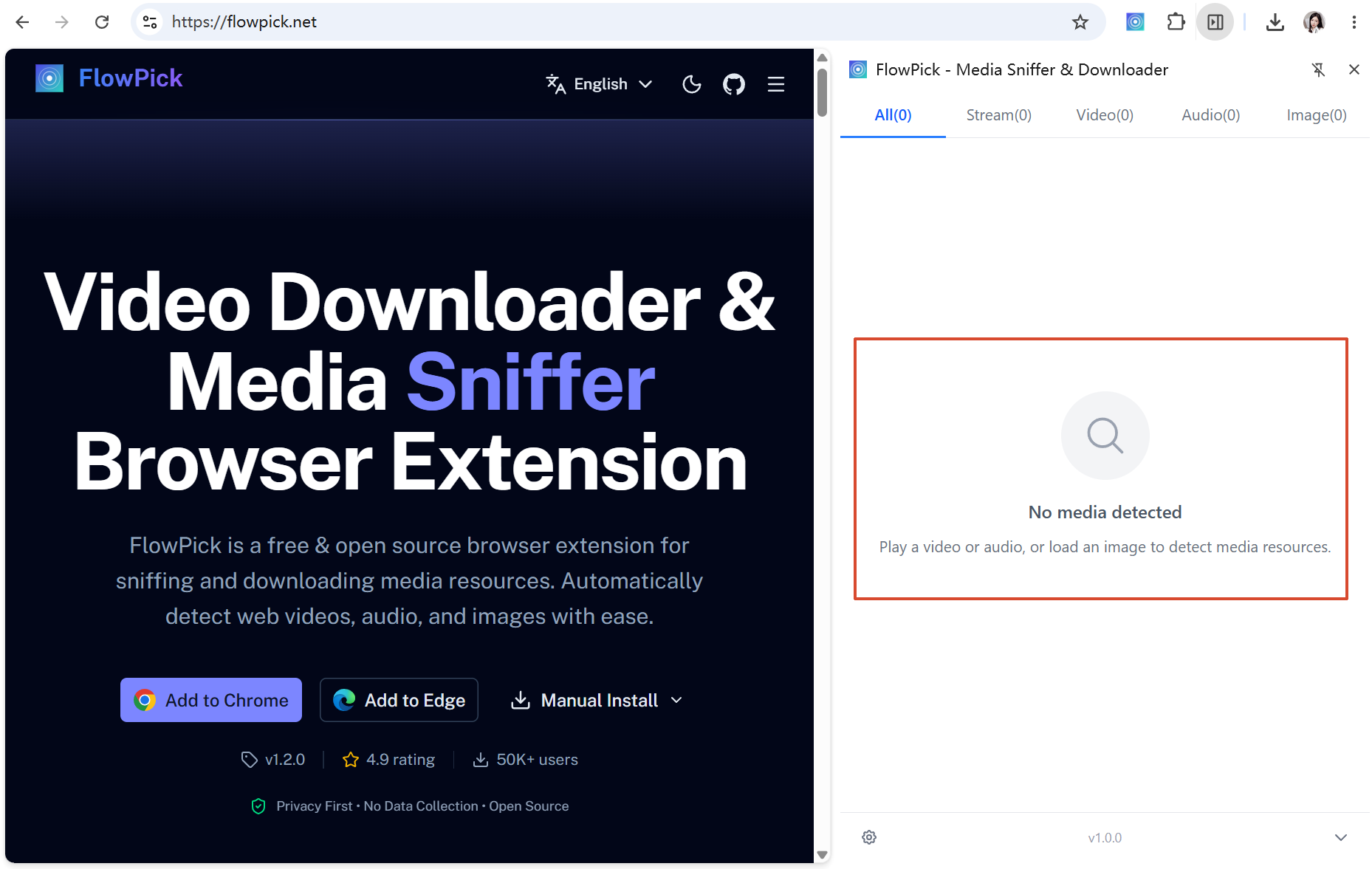
Symptoms: FlowPick's popup shows "no media resources detected," or the list only has thumbnails/covers with no .m3u8 entry.
Common Causes
| Cause | How to confirm | Fix |
|---|---|---|
| Video hasn't started loading | Opened the extension without playing | Play for 3-5 seconds, then open the extension |
| Page loaded before the extension was installed | Page was fully loaded pre-install | Refresh the page to re-trigger requests |
| Site uses MSE instead of native HLS | No .m3u8 request in DevTools | See "What About MSE Sites" below |
| Manifest lives in a cross-origin iframe | Visible in the Network tab but not to the extension | Open the iframe's source page and detect there |
| Ad-blocker or another extension conflicts | Works after disabling other network extensions | Whitelist or reorder your extensions |
| Custom/private protocol | Traffic goes over ws://, blob:, or an encrypted stream | Not supported by FlowPick; see Known Limitations |
Confirm with DevTools
Press F12 → Network tab → type m3u8 in the filter box:
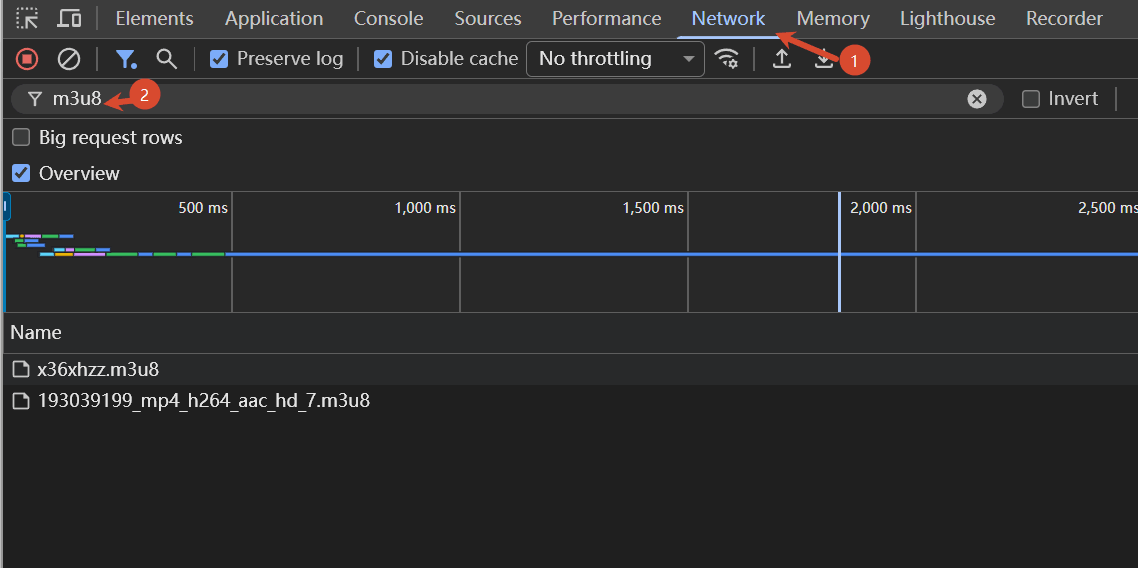
- Request present: the site really is using HLS, and the problem is on the detection side (usually a missing page refresh or an interfering extension).
- No request: the site likely uses MSE (Media Source Extensions) and feeds segments straight to
<video>without ever requesting a.m3u8. FlowPick can't detect those—that's a browser-level limitation.
What About MSE Sites
If the Network tab shows a pile of .m4s / .chunk requests but no manifest file, the site uses MSE plus custom segmentation logic (YouTube is the textbook example). Two options:
- Find a
.mpd(DASH) entry and switch to the DASH Downloader; see DASH has no audio. - Check the
<video>tag'ssrc. If it starts withblob:, that's MSE-generated and not directly downloadable—you'll have to wait for the site to serve a native HLS/DASH manifest.
webRequest.onBeforeRequest, Content-Type sniffing) and the full list of 25+ MIME types, see Video Sniffing — Detection Principles. For the systematic flow when nothing is detected, see Common Issues — Media Detection Issues.Manifest Parsing Issues
Symptoms: M3U8 detected, but the quality list is empty, or the segment count is abnormally low (say, 1), and the download comes out a few KB.
Master or Media Playlist
HLS manifests come in two layers. If the popup shows a Media Playlist (the segment list itself), you may not have quality options to pick. Conversely, if you only have a Master Playlist URL but all variants parse empty, the manifest content is probably incomplete.
Master Playlist          ← lists 360p / 720p / 1080p variants
    └── v_720.m3u8       ← Media Playlist, lists hundreds of .ts segments
            └── seg-001.ts, seg-002.ts, ...
Inspect the Manifest Yourself
Copy the M3U8 URL and take a look with curl (swap in your URL):
curl -sL "https://cdn.example.com/index.m3u8"
A healthy Master Playlist shows #EXT-X-STREAM-INF lines:
#EXTM3U
#EXT-X-VERSION:6
#EXT-X-STREAM-INF:BANDWIDTH=3000000,RESOLUTION=1280x720
v_720.m3u8
#EXT-X-STREAM-INF:BANDWIDTH=8000000,RESOLUTION=1920x1080
v_1080.m3u8
A healthy Media Playlist shows #EXTINF plus segment URLs:
#EXTM3U
#EXT-X-TARGETDURATION:6
#EXT-X-VERSION:3
#EXTINF:6.0,
seg-001.ts
#EXTINF:6.0,
seg-002.ts
#EXTINF:4.2,
seg-003.ts
#EXT-X-ENDLIST
Common Anomalies
| What you see | Problem | Action |
|---|---|---|
| A whole HTML page (login/error page) | URL redirected by anti-hotlink protection | See 403 and Anti-Hotlinking |
Just #EXTM3U | Manifest truncated or incomplete response | Reopen the page and grab a fresh URL |
#EXT-X-KEY present but no segments | Key fetch failed, blocking segment output | See Encrypted Streams Failing to Decrypt |
#EXT-X-ENDLIST but fewer than 5 segments | Live stream just started or already ended | Download the replay only after the stream ends |
| Segment URLs are relative paths | Normal; the parser resolves them against the base URL | Nothing to do |
CODECS fields, discontinuity tags)—exactly where naive downloaders fall over. For full parsing details see the HLS deep dive and Video Sniffing — Master Playlist vs Media Playlist.Segment Downloads Failing
Symptoms: Progress stalls or errors halfway, or the Console floods with 403/404/CORS errors.
403 and Anti-Hotlinking
A 403 Forbidden on segments or the manifest almost always means an anti-hotlink check failed. Three common flavors:
| Type | What it looks like | How FlowPick handles it |
|---|---|---|
| Referer check | curl works but the extension sometimes gets 403 | From v1.1.1 the extension auto-injects the page's Referer |
| Cookie / login state | 403 when logged out, fine when logged in | Use the extension on the original video page so cookies ride along |
| Short-lived token | URL has ?token=xxx&expires=yyy, dead in minutes | See "Expired URLs" below |
Anti-hotlink proxy in the extension (v1.1.1+)
Since v1.1.1, FlowPick ships an anti-hotlink proxy for previews and downloads: image lists, video covers, hover previews, and image/audio/document/subtitle downloads all go through the proxy automatically, carrying the page's Referer and cookies, and the response is checked before saving—so an anti-hotlink HTML error page never gets stored as an image or audio file.
Why online tools often get 403
Online tools run on flowpick.com, and the browser won't forward the target site's cookies or the original page's Referer. As long as the source site has anti-hotlinking, an online tool will basically always fail. For anti-hotlinked sites, use the extension on the original video page.
Reproduce 403 with curl
Fastest way to confirm a Referer issue:
# Without a Referer, likely 403
curl -I "https://cdn.example.com/seg-001.ts"

# With the original page's Referer, should be 200
curl -I -H "Referer: https://www.example.com/watch/123" "https://cdn.example.com/seg-001.ts"
If the second one returns 200, it's a Referer check, confirmed.
Expired URLs (Dynamic Tokens)
Live replays and some VOD platforms use short-lived tokens:
https://cdn.example.com/seg-001.ts?token=ab12cd34&expires=1692300000
expires is a Unix timestamp; past that point everything returns 403/404. The symptoms:
- Download starts fine, then suddenly every segment 403s halfway through.
- Reopening the page works again, but it dies again after a while.
What to do:
- Start the download as soon as the manifest is detected. Don't linger in the popup.
- If a big file gets cut off by a token, refresh the original page so the extension grabs a fresh manifest and continues what's left. (FlowPick's retry handles transient hiccups, but an expired token is a hard failure—you need a new manifest.)
404: Segments Deleted
Mostly a live-replay thing—platforms keep replay segments for a limited window after the broadcast ends, then they 404.
- Try a different quality (different qualities may map to different segment files).
- Confirm the replay is still within its retention window.
CORS Errors
A has been blocked by CORS policy error in the Console is basically always an online tool problem. The extension has host_permissions and isn't subject to the same-origin policy.
| Tool | CORS behavior | Action |
|---|---|---|
| Browser extension | Never triggers CORS | — |
| Online tool | Manifest/segment cross-origin fetch blocked | Switch to the extension; or check whether the source returns Access-Control-Allow-Origin |
Network Interruptions Mid-Download
Transient blips are covered by the retry mechanism. For persistent failures:
- Check network stability (especially behind a proxy/VPN; see Common Issues — Proxy/VPN Environment).
- Drop concurrency to 2-3 to reduce simultaneous connections (some CDNs reject high concurrency).
- Check whether a firewall is blocking the streaming CDN host.
Encrypted Streams Failing to Decrypt
Symptoms: The manifest has #EXT-X-KEY, the download completes, but the merged output is silent/corrupt/won't play, or the Console reports a decrypt error.
AES-128 vs DRM: Know the Difference
FlowPick only supports AES-128, the "plain" encryption. Manifests with these tags won't download, period:
# AES-128 — supported
#EXT-X-KEY:METHOD=AES-128,URI="https://cdn.example.com/key.bin",IV=0x...

# SAMPLE-AES / FairPlay — not supported (DRM-adjacent)
#EXT-X-KEY:METHOD=SAMPLE-AES,URI="skd://..."

# Widevine / PlayReady (common in DASH) — not supported
<ContentProtection schemeIdUri="..."/>
Common AES-128 Decryption Failures
| Cause | How to confirm | Action |
|---|---|---|
| Key URL 403/404 | Console reports key fetch failure | Use the extension on the original page (carries Cookie/Referer); keys can be tokenized too |
| Key requires login | Key 403s logged out, works logged in | Log in first, then download |
| Missing IV | #EXT-X-KEY has no IV= | FlowPick derives the IV from the segment index per spec; nothing to do |
| Key isn't 16 bytes | Wrong length via curl | Source-site anomaly; not something FlowPick can fix |
Verify the Key with curl
# Check whether the key is fetchable—remember to send Referer/Cookie
curl -sL -H "Referer: https://www.example.com/watch/123" \
     "https://cdn.example.com/key.bin" | wc -c
# Should output 16
Anything other than 16 means the key itself is broken. If it's 16 but the extension still fails to decrypt, the extension's request likely didn't carry the Cookie/Referer (upgrade to v1.1.1+, where the anti-hotlink proxy adds them automatically).
What About DRM Content
Widevine, PlayReady, FairPlay, and SAMPLE-AES content is explicitly refused by FlowPick—that's a feature, not a bug. Any downloader that claims to break DRM is either lying or breaking the law. For the legal and technical line, see Is It Legal to Download Streaming Video.
Merged File Won't Play
Symptoms: The file downloaded, size looks right, but VLC/the player won't open it, or there's picture but no sound, or audio drifts out of sync.
Test with VLC First
VLC is the most forgiving player around. Use it to rule out a "player problem":
- Plays in VLC but not the system player → codec/container compatibility issue; use another player.
- Won't play in VLC either → the file itself is broken.
Common Causes
| Symptom | Cause | Action |
|---|---|---|
| File is only a few KB | Downloaded the manifest, not the video | Re-pick the resource; make sure you chose the video, not the .m3u8 |
| Picture but no audio | Multi-audio-track manifest: only the video track was grabbed | See "Multi-Audio-Track Manifests" below |
| Audio out of sync | Non-continuous PTS across HLS segments | Switch to TS output, or re-encode with FFmpeg |
| Corrupt/glitchy video | One or more segments failed, merge incomplete | Re-download and make sure every segment completes |
| MP4 won't open but TS does | stsd box written wrong during remux | See "TS vs MP4 Output Formats" below |
Multi-Audio-Track Manifests
Real HLS manifests (Netflix, Disney+ and the like) often split audio and video into separate playlists:
#EXT-X-MEDIA:TYPE=AUDIO,GROUP-ID="aac-128",NAME="English",DEFAULT=YES,URI="audio/eng_128.m3u8"
#EXT-X-STREAM-INF:BANDWIDTH=3000000,...,AUDIO="aac-128"
v_720.m3u8
If a downloader only grabs v_720.m3u8 and concatenates segments, you get a silent video. FlowPick fetches the audio track too and merges it—but only if you select a variant that includes audio rather than the video stream alone. Full handling of multi-audio manifests: HLS deep dive — EXT-X-MEDIA.
TS vs MP4 Output Formats
If MP4 won't open, switch to TS output first. Why:
- TS segments are concatenated raw; MPEG-TS carries its own codec info, so it almost never goes wrong.
- MP4 remuxing has to parse the
CODECSfield and write thestsdbox correctly—nonstandard codec identifiers trip it up.
If TS plays but MP4 doesn't, it's a remux problem. Use TS as a stopgap, or remux manually with FFmpeg:
ffmpeg -i output.ts -c copy output.mp4
-c copy skips re-encoding, so it's done in seconds.
Large Files / Browser Freezes
Symptoms: The browser stutters or crashes on files over 1 GB, or the download dies at some percentage.
This is a write strategy problem, not an HLS one. FlowPick's three-tier write strategy:
| Strategy | Trigger | Ceiling |
|---|---|---|
| File System Access API | Chrome/Edge 86+ | No hard limit |
| StreamSaver.js | Browsers with Service Worker support | No hard limit |
| Blob fallback | Everything else | 1.5 GB hard limit |
In Blob mode, files over 1.5 GB are refused outright. The fixes:
- Use Chrome/Edge 86+ and enable "Choose save directory."
- Firefox has no FSA; large files go through StreamSaver or OPFS temp storage (optimized in v1.1.1+).
- As a last resort, drop concurrency to 1-2 to cut memory usage.
Diagnostics Cheat Sheet
Press F12 to open DevTools. These are the most useful checkpoints:
| What to check | Panel | How |
|---|---|---|
| Was M3U8 requested at all | Network | Filter by m3u8, refresh the page, play the video |
| Segment request status codes | Network | Filter by .ts or .m4s, look at the Status column |
| What headers the request carried | Network → select request → Headers | Look at Request Headers for Referer/Cookie |
| Decrypt errors | Console | Search for decrypt or AES |
| Merge errors | Console | Search for ffmpeg or wasm |
Generate an Environment Diagnostic Report
For stubborn issues, run this in the Console to produce environment info you can share:
const report = {
  ua: navigator.userAgent,
  fsa: 'showDirectoryPicker' in window,
  sab: typeof SharedArrayBuffer !== 'undefined',
  coi: self.crossOriginIsolated,
  storage: await navigator.storage?.estimate().catch(() => null),
  ts: new Date().toISOString(),
}
console.log(JSON.stringify(report, null, 2))
The report only contains browser environment info—no browsing history or personal data.
When It Really Can't Be Downloaded
FlowPick is built for public, standard HLS playlists. The following are unsupported by design, not bugs:
- DRM-protected content (Widevine / PlayReady / FairPlay / SAMPLE-AES)
- Content behind login or paywall bypass
- Sites that use MSE with custom segmentation and never serve a native M3U8/MPD
- Media transported over private protocols, WebSocket, or WebRTC
In these cases, the right behavior is to error out rather than silently produce a broken file—that's FlowPick's stance. The legal and technical bottom line: Is It Legal to Download Streaming Video.
Related Documentation
- M3U8 Downloader — the online tool, for public streams without anti-hotlinking
- Common Issues — systematic troubleshooting across all formats
- Video Sniffing — HLS/DASH detection and AES-128 decryption internals
- Download Engine Architecture — segment concurrency, retry, three-tier writing
- Format Conversion — TS/MP4 remuxing
- Known Limitations — hard limits like DRM, Manifest V3, CORS
- HLS deep dive — real manifests, encryption, and multi-track edge cases
- How FlowPick Merges Video Segments in the Browser — the TS/MP4 merge implementation
- v1.1.1 Release — anti-hotlink proxy previews and downloads
FAQ
High-frequency questions and answers for FlowPick usage, covering installation, download, format conversion, and troubleshooting scenarios.
DASH Video Has No Audio: MPD Troubleshooting
Fix missing audio after downloading an MPD or MPEG-DASH stream. Covers separate tracks, missing manifest entries, CORS, DRM, and incomplete manifests.